DJI Goggles 2 Motion Combo FPV Drone Goggles Micro-OLED O3+ Video Transmission Review (2026)
Updated September 21, 2026 · Research-based review
Our verdict
A strong choice for pilots who want crisp, low latency digital FPV without learning stick controls first, since the Motion Combo pairs sharp Micro-OLED goggles with a point-and-fly controller. Acro and racing pilots should look elsewhere, and it is worth checking against the newer Goggles 3 before buying.
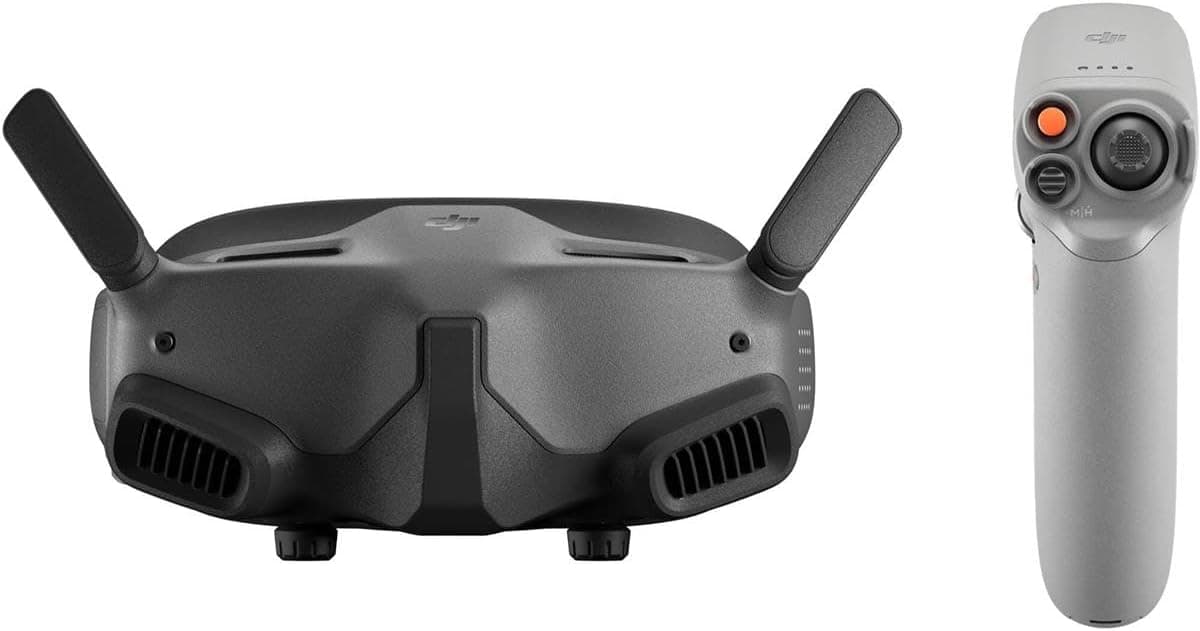
DJI Goggles 2 Motion Combo with Micro-OLED screens and O3+ video transmission, pairing goggles with a motion controller.
Price range: See on Amazon
What we liked
- + Micro-OLED screens produce a crisp, high contrast view for smooth flights
- + Motion controller lets beginners fly by pointing, which is easier than sticks
- + O3+ video link gives stable, low latency digital HD with DJI drones
Trade-offs
- - Motion controller is not suited to acro or racing, so experienced pilots need a radio
- - Goggles 3 is the newer model, so compatibility with the newest DJI drones should be checked
Display and video quality
The Goggles 2 use two 1080p Micro-OLED screens capable of up to a 100Hz refresh rate, which gives a noticeably sharper, higher contrast image than the LCD panels found in many older digital FPV goggles. Field of view runs up to 155 degrees at wider aspect ratios, filling more of your peripheral vision for a more immersive feel during flight. Combined with DJI's O3+ video transmission system, the goggles deliver ultra low latency digital HD video, with DJI quoting as low as 30 milliseconds at 1080p and 100 frames per second, or 40 milliseconds at 60 frames per second, figures that are competitive with the fastest digital FPV systems on the market.
The motion controller experience
What sets the Motion Combo apart from the standard Goggles 2 package is the included RC Motion 2 controller, which lets pilots fly by tilting and pointing their hand rather than using twin sticks. This dramatically lowers the learning curve for people who have never flown FPV before, since the drone follows natural hand movement instead of requiring the muscle memory a traditional radio demands. The motion controller runs for roughly five hours on a charge and weighs about 167 grams, light enough to hold comfortably through an extended flying session. It pairs specifically with DJI's own FPV-capable drones like the Avata line rather than working as a generic RC transmitter.
Comfort and everyday use
The goggles support diopter adjustment from minus 8.0 to plus 2.0 diopters, which means many glasses wearers can fly without corrective lenses getting in the way of the eyecups. Battery life on the goggles themselves runs up to about two hours, enough for a solid multi-battery flying session before needing a recharge, and the unit is built to be lightweight and portable for pilots who want to carry a full FPV kit without a bulky case. The combination of a comfortable fit and a fast, responsive digital link is what makes these goggles practical for longer sessions rather than just short demo flights.
Where the motion controller falls short
The RC Motion 2 is deliberately built for accessible, cinematic style flying rather than the tight, aggressive inputs that acro tricks or gate-to-gate racing demand. Pilots who want to push a drone through flips, rolls, or a technical race course will need a proper dual-stick radio instead, since motion control simply cannot deliver the same precision for those maneuvers. Buyers should also weigh this combo against DJI's newer Goggles 3, which pairs with the faster O4 video system and is the current flagship, meaning compatibility with the very newest DJI FPV drones is worth double checking before choosing the Goggles 2 over the newer model.
Who this combo suits
This is a strong pick for newcomers to FPV who want an easy, intuitive way into immersive flight, as well as for cinematic flyers who care more about smooth, sweeping shots than technical stick precision. The sharp Micro-OLED image and low latency link also appeal to anyone upgrading from an older or lower resolution FPV goggle set who wants a clear step up in video quality. Experienced acro or racing pilots, and anyone set on flying DJI's newest drones with the O4 system, will likely be better served by a stick-based radio and the newer Goggles 3 instead.
Frequently asked questions
Can I fly with the DJI Goggles 2 Motion Combo without prior FPV experience?
Yes, the included RC Motion 2 controller is designed to let beginners fly by pointing and tilting rather than using traditional sticks, which lowers the learning curve considerably.
What is the video latency on the DJI Goggles 2?
DJI rates the O3+ video transmission as low as 30 milliseconds at 1080p and 100 frames per second, and as low as 40 milliseconds at 1080p and 60 frames per second.
Can I use a normal radio instead of the motion controller?
The goggles can pair with compatible DJI FPV drones and other transmitters, but the Motion Combo specifically bundles the RC Motion 2 for point-and-fly control rather than a stick radio.
Should I buy the Goggles 2 or wait for the Goggles 3?
The Goggles 3 is DJI's newer flagship with the faster O4 video system, so pilots planning to fly DJI's newest drones should check compatibility before choosing the Goggles 2.
Prices change often, so check the current price and availability on Amazon.
Check price on AmazonDrone FPV Lab may earn a commission from the link above.